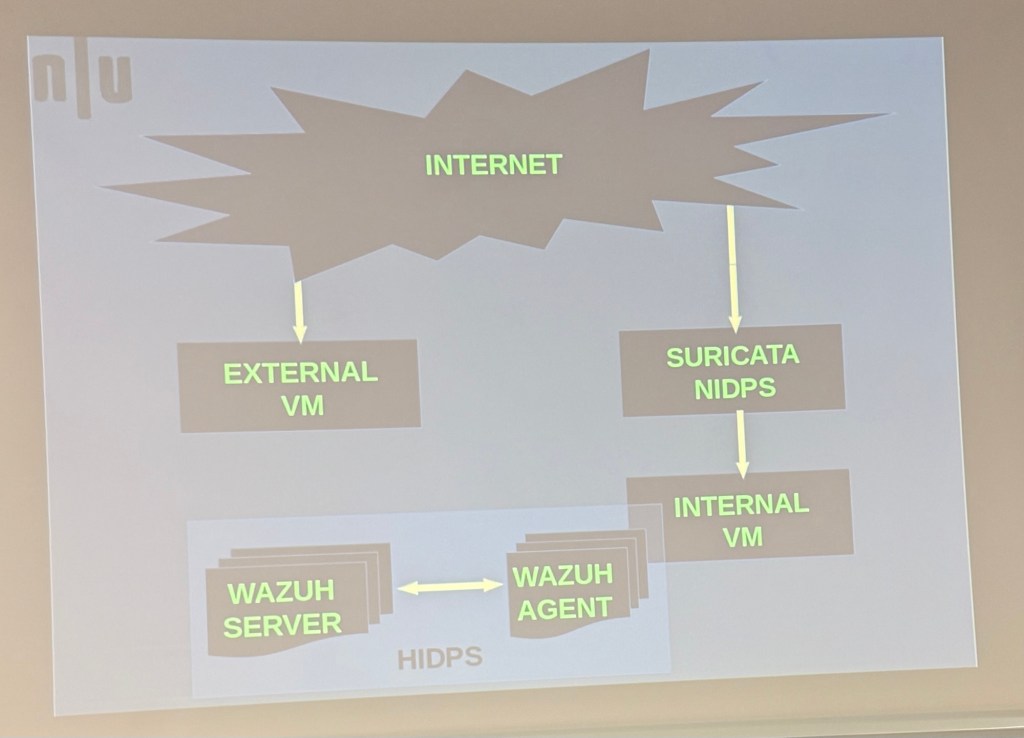
diagram shows a layered intrusion detection setup. Internet traffic flows to an external VM and through Suricata NIDPS before reaching an internal VM, which is monitored by Wazuh agents. The Wazuh server collects and analyses alerts from the agents, forming a Host-based Intrusion Detection and Prevention System (HIDPS). Suricata is like CarbonBlack and Paloalto
Corporate network IPs and subnets need to be whotelisted
Proxy server will determine how to run the traffic
Proxy server fetched the details and the user’s identity is anonymous
DNS poisoning attacks
Multipass is a virtual machine solution similar to Docker, but it comes with Suricate preinstalled, making setup easier. Unlike VMware, which consumes a lot of RAM and has a heavier user interface, Multipass provides a lighter and more efficient environment. This combination is often referred to as Multipass-Suricata.
Using NMAP the hacker has scan the open ports
Suricata rule structure defines how to write detection rules for network traffic. The format is action protocol source_ip source_port <direction-operator> dest_ip dest_port (options), and the example shown triggers an alert for TCP traffic to 192.168.1.10 on port 80 if it finds the string “badstring” in the payload.
Port 80 is HTTP
Port 443 is HTTPS
Suricata then VM then firewalls
We will left traffic hot the firewall
At firewall level the load will reduce
Then it will hit suricata, causing less money spent on RAM and storage
If we want to install into windows/
Server to connect and see in dashboard
GitHub repo: https://github.com/sayandip-chatterjee
Application Layer (Layer 7)
Suricata operates mainly here, analysing application-level traffic for intrusion detection and prevention.
It inspects protocols like HTTP, DNS, SMTP, etc.
Transport Layer (Layer 4)
The firewall will handle some filtering at transport level, such as blocking or allowing traffic based on TCP/UDP ports.
Traffic first passes through the firewall, and its load reduces before reaching Suricata.
Network Layer (Layer 3)
Firewalls also inspect IP addresses and apply packet filtering policies here.
By reducing unwanted traffic at this layer, RAM and storage usage in Suricata drops.
Data Link and Physical Layers (Layers 1–2)
VM networking and NICs pass the traffic but typically have minimal filtering role in this flow.
Flow Summary:
Step 1: Incoming network traffic arrives → handled first by the firewall (Layers 3–4) → unwanted traffic dropped.
Step 2: Cleaned traffic passes through the VM network stack (Layers 1–2).
Step 3: Suricata inspects valid traffic at Layer 7, minimising RAM and storage costs due to reduced load.
This approach ensures that the majority of traffic is filtered before reaching Suricata, optimising resource usage.

 Data Centric