An application is a program or software designed to perform specific tasks for users.
Examples:
Mobile Apps: WhatsApp, Instagram.
Desktop Software: Microsoft Word, Adobe Photoshop.
Web Applications: Gmail, Amazon, YouTube.
Application security refers to the process of identifying and repairing vulnerabilities in application software-from development to deployment-to prevent unauthorized access, modification, or misuse.
Why Application Security Matters?
Applications handle sensitive data (e.g., passwords, credit card numbers).
If not secured, they can be hacked, leading to:
Financial losses.
Data breaches.
Loss of trust.
Example:
Imagine a banking app. If a hacker exploits a security weakness, they could:
Steal customer money.
Access private data like account details.
Application Security ensures that the app is protected from such threats.
Economic Impact:
/ Direct financial losses.
/ Cost of recovery and mitigation.
/ Impact on businesses and economies.
Operational Disruption:
/ Downtime and loss of productivity.
/ Impact on critical infrastructure (e.g., healthcare, energy).
Reputational Damage:
/ Loss of customer trust.
/Long-term brand damage.
• Example: Target data breach, motor Legal battles and settements.
Legal and Regulatory Consequences:
Fines and penalties.
Societal Impact:
Impact on individuals privacy and personal data.
National security implications.
Goals
The primary goals of application security can be explained using the CIA Triad:
Confidentiality: Protect sensitive data from unauthorized access.
Integrity: Ensure data is accurate and hasn’t been altered.
Availability: Ensure the application is accessible when needed.
Example:
A ride-hailing app like Uber:
Confidentiality:
v Customer data (name, location, credit card) is encrypted.
Integrity:
/ Ride prices and route information cannot be tampered with by hackers.
Availability:
* The app must be available during peak times without crashing.
OWASP Top 10 – The Most Critical Web Application Risks (2021)
Broken Access Control – Users can act outside their intended permissions. If there is no proper access controls as there is no RBAC. Different roles needed for different people. A user having admin level access is broken access control vulnerability.
Cryptographic Failures – Sensitive data not properly protected. Data at rest (stored at server or database) and Data in motion (client is the browser where we are accessing the server, the server example is Amazon which is somewhere in the cloud. We can use TLS or SSL certificates, hashing algorithms or encryption we can secure the data from the vulnerabilities.
Injection – Untrusted input leads to SQL or command injection. The bad actor can try to manipulate the server or UI. Untrusted inputs can lead to command injection, SQL injection or cross site scripting.
Insecure Design – Weak security architecture or logic flaws. No CAPCHA in place, for sensitive data like for banking industries no consent is taken from the end users.
Infrastructure Security Misconfiguration – Default credentials, exposed error messages with server or application details or any sensitive related documents is exposed to the internet.
Vulnerable and Outdated Components – Using old or unpatched libraries. Developers will be using third parties and won’t be relying on source code developed by the developers. That will also be integrated into our system. So that should also be done that is where the Software Composition Analysis comes. So it finds third party vulnerabilities in the system if there are, or any kind of licensing issues, legal issues.
Identification and Authentication Failures – Weak login or improper session handling. No complex passwords set. No MFA set, no session management especially applicable for banking individuals, it should automatically get logged out.
Software and Data Integrity Failures – Unverified updates or CI/CD pipeline flaws. DLLs/libraries/Compiled codes or libraries of Microsoft (.net), suppose we get it from another source instead of Microsoft tool from another source. Proper resources or it will have software and integrity failures.
Security Logging and Monitoring Failures – Missing logs or delayed detection. If someone has deleted a feature in an application that won’t be recorded or logged into the system so investigation can’t be done, delayed detection or missing logs is another vulnerability.
Server-Side Request Forgery (SSRF) – App fetches remote resources without validation. Hackers try to target the Internal end points so they do exploitation inside the system itself.
Common Web Applications Functions
1. User Interaction
Login/Registration
User Profile Management
2. Data Management
Upieading files, storing Information.
Detabase interactions (CRUD operations)
3. E-commerce Features
Shopping carts and payments.
Order tracking and history
4. Search and Navigation
• Search bars, titers, and menus
5. Communication
• Chat systems and email notifications
6 APIs for Integration
Third-party service integration (eg. payment gateways, maps)
What is SDLC?
Definition: A process the software industry uses to design, develop, and test high-quality software.
Phases of SDLC
Planning: Gathering requirements, feasibility study, and project planning
Analysis: Detailed analysis of requirements and system design.
Design: Architectural design, Ul/UX design, and database desige.
Implemantation: Actual coding and development of the software
Testing: Testing for bugs, and errors and ensuring the software meets requirements.
Deployment: Releasing the software to users.
Maintenance: Ongoing support, bug fixes, and updates.
Waterfall model
Overview:
Linear and sequential approach.
Each phase must be completed before the next begins, co
Key Characteristics:
Sequential Phases: Each phase depends on the deliverables of the previous one.
Extensive Documentation: Detailed documentation at each stage.
Advantages:
Clear structure and easy to understand.
Well-documented process.
Easier to manage due to its linear nature.
Disadvantages:
Inflexible to changes once a phase is completed.
Late discovery of issues can be costly.
Not suitable for complex and evolving projects.
Project: Development of an Enterprise Resource Planning (ERP) System
Scenario: A manufacturing company wants to implement an ERP system to integrate and manage its business processes, including inventory, production, and finance.
Approach:
Requirements: Gather detailed requirements and create a specification document.
Design: Develop system architecture and detailed design documents.
Implementation: Code modules for inventory, production, and finance sequentially.
Verification: Test the system against requirements (unit, integration, system testing).
Deployment: Deploy the system and conduct training sessions.
Maintenance: Provide ongoing support and updates.
The outcome of the Waterfall Model: Integrated and streamlined business processes as per initial requirements.
Agile Model
Overview:
Iterative and incremental approach.
Emphasizes flexibility, collaboration, and customer feedback.
Key Principles:
• Individuals and interactions over processes and tools..com
Working software over comprehensive documentation.
Customer collaboration over contract negotiation.
Responding to change over following a plan.
Advantages:
Flexibility to adapt to changes.
Continuous delivery of valuable software.
High customer satisfaction due to regular feedback.
Disadvantages:
Requires experienced team members.
Challenging to predict timelines and costs.
Agile Model example
Project: Development of a Mobile Banking App
Scenario: A bank wants to develop a mobile banking app to provide customers with easy access to their accounts, transactions, and other banking services.
Approach:
Requirements Gathering: Collect initial requirements and prioritize features.
Design: Create a simple design for the first iteration.
rictoria.atri
Development: Work in short sprints (e.g., 2 weeks) to develop features.
Testing: Perform testing during each sprint and gather feedback.
Deployment: Deploy to a small group for beta testing.
Review and Retrospective: Review and improve after each sprint.
The outcome of the Agile Model: Continuous improvement and incremental feature addition based on user feedback.
DevOps pipelines
Overview:
A set of automated processes and tools for building, testing, and deploying cod
Integrates development and operations for continuous delivery.
Key Components:
Continuous Integration (CI): Frequent code integration and automated testing.
Continuous Deployment (CD): Automated deployment to production environment
Tools:
Jenkins: Open-source automation server.
GitHub Actions CI/CD: Integrated CI/CD in Git Hub.
Code
CircleCI: Continuous integration and delivery platform.
Azure DevOps: Microsoft’s DevOps solution.
DevSecOps Pipelines
Overview:
Integrates security practices into the DevOps pipeline.
Ensures security is a continuous part of the development process.
Key Components:
Security Integration: Security checks are integrated into CI/CD pipelines.
Automated Security Testing: Continuous security testing during development.
Compliance Monitoring: Ensuring compliance with security standards and regulations.
Stages:
Plan (pre-production): Identify and address security and organizational requirements, and set clear project goals with risk considerations.
Build (pre-production): Use secure coding practices, perform code analysis, and implement automated security checks as software is developed.
Test (pre-production): Conduct manual and automated security testing, including static and dynamic application security testing (SAST/DAST).
Deploy (production): Ensure secure deployment through configuration management, vulnerability scanning, and policy enforcement.
Operate (production): Maintain secure operations using logging, incident response, and regular patching of vulnerabilities.
Monitor (production): Continuously track system activity with SIEM, access control, and threat detection to respond quickly to risks.
Different Ways to Secure Applications
SAST (Static Application Security Testing) – Scan source code for vulnerabilities before execution.
DAST (Dynamic Application Security Testing) – Test the running app for runtime and logic flaws
SCA (Software Composition Analysis) – Identify vulnerabilities in open-source dependencies.
laC Scanning – Detect misconfigurations in cloud and infrastructure code.
Penetration Testing – Simulate real-world attacks to assess security posture.
Container & Image Scanning – Finds vulnerabilities in Docker images and container layers.
Secrets Scanning – Detects hardcoded credentials or API keys in source repositories.
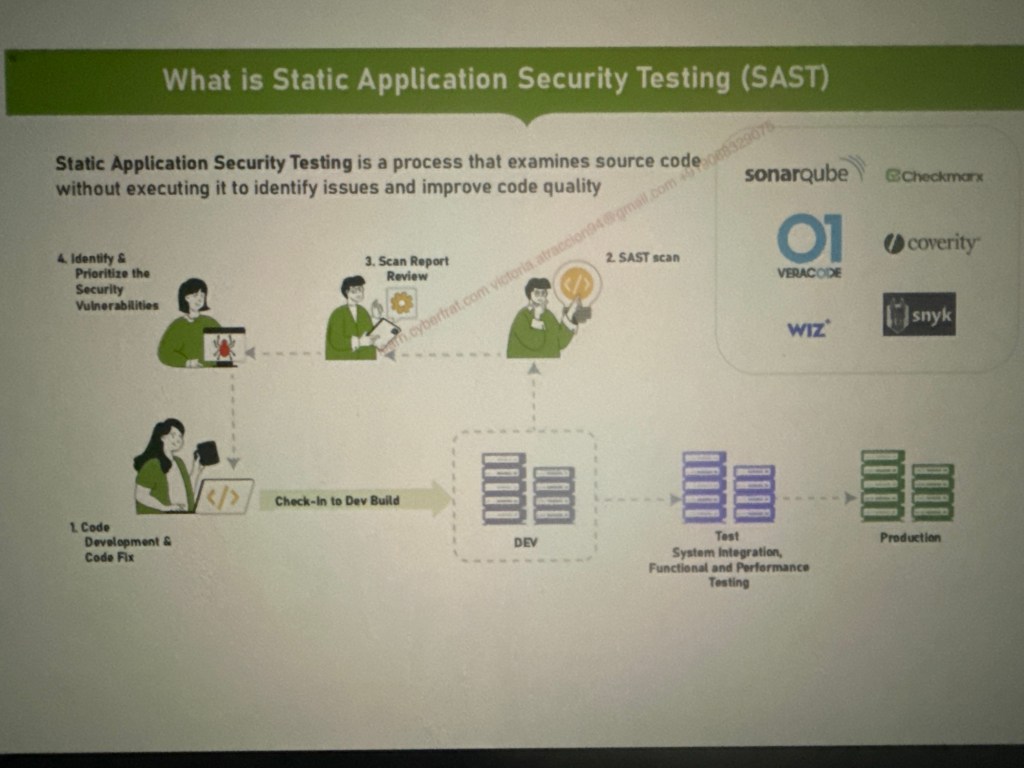
What is Static Application Security Testing (SAST)
The SAST workflow begins by developers writing code and committing it to a repository. Once the code is pushed, a CI/CD pipeline triggers a SAST scan, which analyzes the source code, binaries, or bytecode for security vulnerabilities without executing the application. Detected issues are reported back to developers, who then review and fix them before merging into the main branch. Finally, the secure code moves through the CI/CD pipeline toward deployment, ensuring vulnerabilities are minimized early in the lifecycle.
What is SonarQube?
• An open-source platform for continuous inspection of code quality.
• Developed by SonarSource.
Purpose:
Detects bugs, code smells, and security vulnerabilities.
Supports 30+ programming languages
Documentation: https://www.sonarsource.com/
Key Features of SonarQube
Static Code Analysis:
• Automated reviews with static analysis.
Code Quality Metrics:
• Measures code duplication, complexity, and coverage.
• Identifies security vulnerabilities.
Integration:
• Works with CI/CD tools like Jenkins, GitHub Actions, and Azure Pipelines
Demo Setup:
SonarQube Server: Hosted on AWS, displaying detailed code analysis results.
GitHub: Source code repository for integration with Jenkins.
Jenkins CI/CD: Automated SAST scan using SonarQube Scanner.
VS Code: Using SonarLint for real-time code analysis.
Cloud Environment & Tools Used:
• As cloud locat Senaraude & Jankine severs
VS Code IDE – Local development
Snyk Code – Developer-centric SAST
GitHub Repository – Source code version controlSnyk Code – Developer-centric SAST
Key Takeaway: “Integrating SAST in CI/CD ensures vulnerabilities are caught as early as possible – shifting security left in the SDLC.”
Security Controls
/ Input Validation
/ Authentication Mechanisms
/ Access Control
/ Data Encryption
/ Secure Coding Practices / Regular Security Testing
/ Use Secure Frameworks and Libraries
Implement a Software Bill of Materials (SBOM)
/ Monitor and Log Activity
/ Protect Against Common Attacks
/ Session Management
/ Educate Developers and Users
/ Incident Response Plan

 Data Centric